

In this tutorial, we will learn how to make a plot using ggplot2 such that the column name of interest in a plot is saved as a variable. And we are interested in using the variable name to make a boxplot. The ability to use a column name as a variable help us make more… Continue reading How to make a plot with column name in a variable
Category: ggplot2
Multiple ways to remove legend in ggplot2
Removing legends in ggplot2 is a common requirement when creating clean, professional data visualizations. While legends help identify different groups or categories, there are situations where they become redundant, clutter the plot, or aren’t needed for your specific visualization goals. In this comprehensive ggplot2 legend removal tutorial, you’ll discover 4 different methods to remove legends… Continue reading Multiple ways to remove legend in ggplot2
How to reverse legend key order in ggplot2

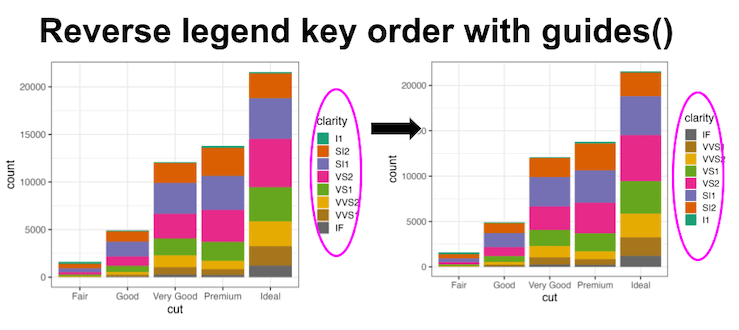
Reversing legend order in ggplot2 is essential for creating intuitive data visualizations where the legend arrangement matches your data hierarchy or presentation needs. By default, ggplot2 displays legend keys in alphabetical order, but often you’ll want to reverse ggplot2 legend order to better align with your data story or visual flow. In this comprehensive ggplot2… Continue reading How to reverse legend key order in ggplot2
How to Increase Legend Key Size in ggplot2

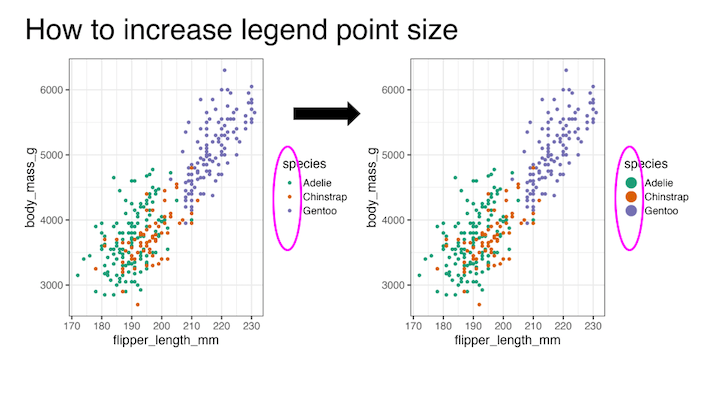
Learning how to increase legend key size in ggplot2 is essential for creating readable and professional data visualizations. When working with scatter plots containing multiple groups or using transparency (alpha), default legend keys can become too small or difficult to distinguish, making it hard for viewers to match colors between the plot and legend. In… Continue reading How to Increase Legend Key Size in ggplot2
Lollipop plot with ggplot extension ggalt
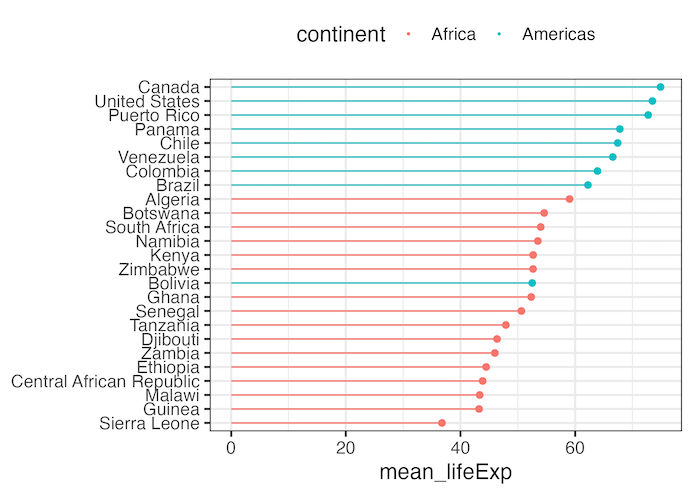
Creating a lollipop plot with ggalt is an excellent way to visualize ranked data with minimal ink usage compared to traditional bar charts. The ggalt package extends ggplot2 functionality with geom_lollipop(), making it easy to create elegant stick-and-circle visualizations that are both space-efficient and visually appealing. In this comprehensive lollipop plot ggalt tutorial, you’ll learn… Continue reading Lollipop plot with ggplot extension ggalt