
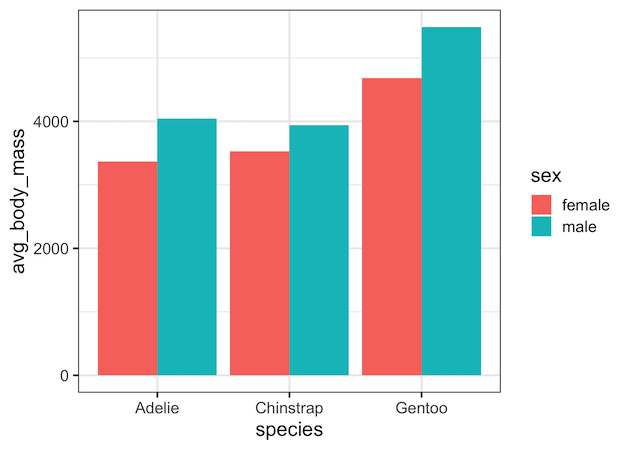
When you have dataset with two categorical variables and one quantitative variable, a grouped barplot is a great way to see the relationship among the variable. In a simple barplot, we have categorical variable on x-axis and have bars showing the numerical value of the quantitative variable. In a grouped barplot, we add the third… Continue reading How to Make Grouped/Stacked Barplot in R?
Grouped Boxplot with Jittered Points with Seaborn Python


Grouped boxplots help us visualize the relationship between three variables, two categorical variables and one quantitative variable. When we make a boxplot, it is always a good idea to add the original data points on top of the boxplot, when possible. In this post, we will learn how to make grouped boxplots with jittered data… Continue reading Grouped Boxplot with Jittered Points with Seaborn Python
How to Change X and Y Axis Values from Real to Integers in ggplot2

When you make a plot with ggplot2, it automatically chooses appropriate range for x and y-axis values and it can be either floats or integers. In this post, we will see how to change X/Y-axis values to integers. In ggplot2, we can use scale_x_continuous() and scale_y_continuous() functions to change the axis values. Let us first… Continue reading How to Change X and Y Axis Values from Real to Integers in ggplot2
How to Make Grouped Boxplot with Jittered Data Points in ggplot2
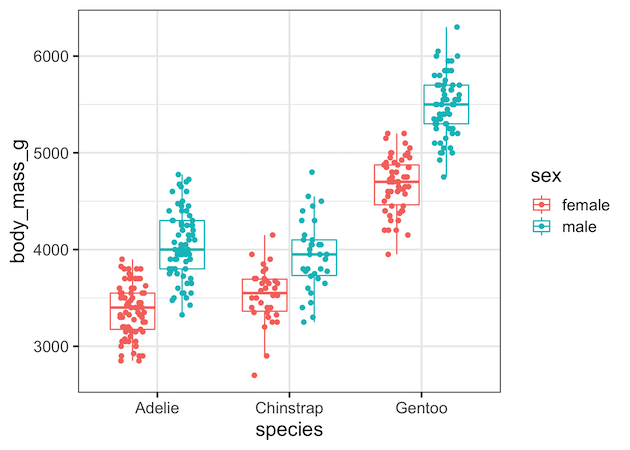
Grouped boxplots are excellent for comparing distributions across multiple categories, but they can hide important details about sample sizes and individual data points. By adding jittered points to your ggplot2 boxplot with points, you create more informative visualizations that reveal both summary statistics and the underlying data structure. In this tutorial, you’ll master creating grouped… Continue reading How to Make Grouped Boxplot with Jittered Data Points in ggplot2
How To Change Edge Color on Seaborn Scatter Plot?

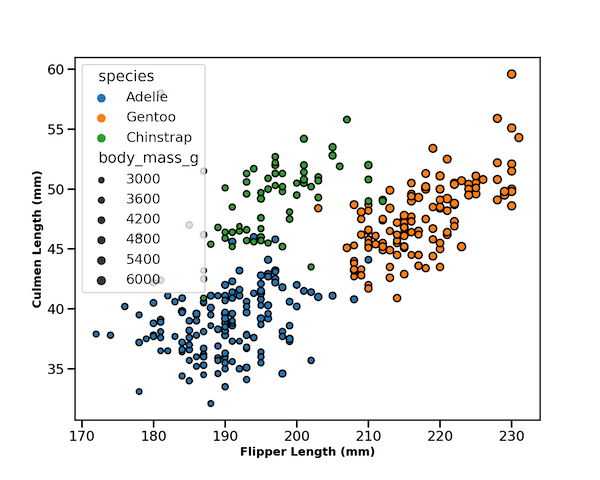
Seaborn’s scatterplot function allows us to make compelling scatter plots easily. In this post we will learn how to customize edge color of a scatter plot made with Seaborn. By default, Seaborn’s scatter plot function colors the markers edge color to be white. In this post, we will see how to change the default edge… Continue reading How To Change Edge Color on Seaborn Scatter Plot?