Last updated on December 18, 2019
Adding regression line to scatter plot is a great way to understand the relationship between two numeric variables.
In this post, we will see an example of using Altair to make a scatter plot with regression line using real world dataset.
Let us load the packages we need. We will load Altair package and load data sets from vege_datasets.
import altair as alt
from vega_datasets import data
We will use the Seattle weather data set to make scatterplot with a linear regression line.
seattle_weather = data.seattle_weather()
Here is how the data looks like.
print(seattle_weather.head(n=3))

        date  precipitation  temp_max  temp_min  wind  weather
0 2012-01-01            0.0      12.8       5.0   4.7  drizzle
1 2012-01-02           10.9      10.6       2.8   4.5     rain
2 2012-01-03            0.8      11.7       7.2   2.3     rain
The basic idea behind making scatter plot with a regression line in Altair is to create scatter plot first using a base Altair object and then add regression line on top of it.
Let us first make a scatter plot with Altair and save it as an object.
sc_plot = alt.Chart(seattle_weather).mark_point().encode(
    x='temp_max',
    y='temp_min'
)
We can make regression line using transfor_regression() function and we can add it as another layer to the scatter plot. We need to specify which variables in our dataframe needed to be used to do the regression analysis and make regression line.
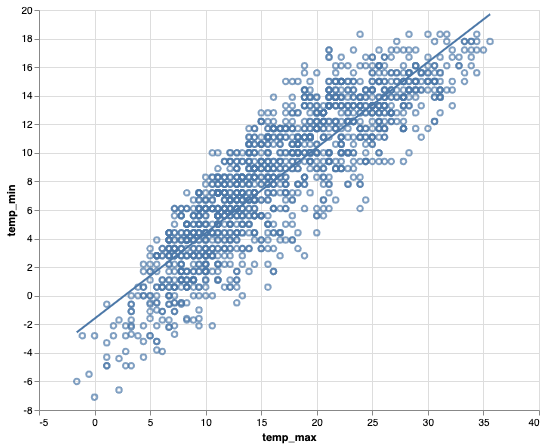
sc_plot + sc_plot.transform_regression('temp_max', 'temp_min').mark_line()
By default, Altair adds a blue regression line to the scatter plot as show below.