Last updated on June 19, 2020

The goal of patchwork is to make it ridiculously simple to combine separate ggplots into the same graphic. As such it tries to solve the same problem as gridExtra::grid.arrange() and cowplot::plot_grid but using an API that incites exploration and iteration, and scales to arbitrarily complex layouts.
In this tutorial, we will a simple example of combining multiple plots made with ggplot2 into a single figure using the R package patchwork.
library(tidyverse)
library(patchwork)
theme_set(theme_bw(base_size=16))
We will use processed data from 2019 StackOverlflow Developer Survey data to make multiple plots with ggplot2.
Let us load the processed data from github.
stackoverflow_file <- "https://raw.githubusercontent.com/datavizpyr/data/master/SO_data_2019/StackOverflow_survey_filtered_subsampled_2019.csv"
survey_results <- read_csv(stackoverflow_file)
The processed data from StackOverlflow survey has years of coding experience, education and salary.
survey_results %>% head()


## # A tibble: 6 x 7
##   CompTotal Gender Manager YearsCode Age1stCode YearsCodePro Education
##       <dbl> <chr>  <chr>   <chr>     <chr>      <chr>        <chr>
## 1    180000 Man    IC      25        17         20           Master's
## 2     55000 Man    IC      5         18         3            Bachelor's
## 3     77000 Man    IC      6         19         2            Bachelor's
## 4     67017 Man    IC      4         20         1            Bachelor's
## 5     90000 Man    IC      6         26         4            Less than bachelor…
## 6     58000 Man    IC      16        14         4            Bachelor's
Let us make three plots with ggplot2 and save the ggplot2 object into three variables.
First plot is a scatter plot between years of professional coding experience and years of coding experience.
p1 <- survey_results %>%
  mutate(YearsCode=as.numeric(YearsCode),
         YearsCodePro=as.numeric(YearsCodePro)) %>%
  ggplot(aes(x=YearsCode, y=YearsCodePro)) +
  geom_point()
And the second plot is a histogram of years of coding experience
p2 <-survey_results %>%
  mutate(YearsCode=as.numeric(YearsCode)) %>%
  ggplot(aes(x=YearsCode)) +
  geom_histogram(bins=50, color="black",fill="dodgerblue")
And the third plot is also a histogram of developer salary.
p3 <- survey_results %>%
  mutate(YearsCode=as.numeric(YearsCode)) %>%
  ggplot(aes(x=CompTotal)) +
  geom_histogram(bins=100,color="black",fill="dodgerblue")  +
  scale_x_log10()+
  labs(x="Developer Salary")
Combine Multiple ggplot2 plots with patchwork
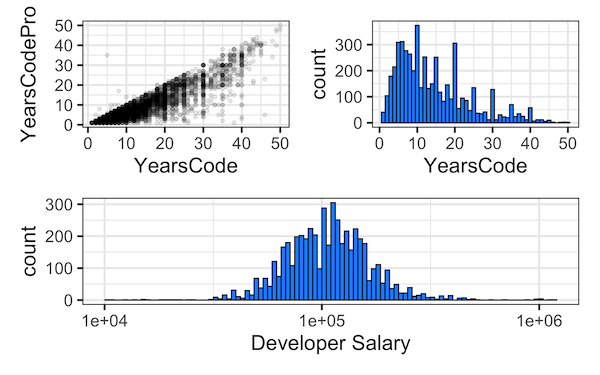
Let us combine the three plots made with ggplot2 into a grid such that the first row contains the first two plots (p1 and p2) and the second row contains the second plot.
(p1+p2)/p3
Combine Multiple ggplot2 plots with a tag for each plot
When you combine multiple plots, it is a good idea to name or tag each plot either with letters or roman numerals. Using Patchwork, we can tag each plot object using plot_annotation() function as shown below.
(p1+p2)/p3 + plot_annotation(tag_levels = 'A')

Want to learn more examples of using patchwork on ggplot2 plots? Check out here for more patchwork examples.